


AI product photography is becoming a practical operations tool, not only a creator tool. Loupe Factory's AI image editing helps manufacturers and wholesalers use a simple background remover and product image enhancement workflow to turn everyday inventory photos into cleaner, studio-quality product images for catalogues, buyer presentations, e-commerce product photos, and product catalogue images.
Loupe Factory AI image editing turns inventory photos into sales-ready product images
Most product photos start as operational evidence: a gemstone parcel on a desk, a jewelry piece in a tray, a finished item on a workbench, or a product lot photographed during receiving. Those photos are useful inside the business, but they often look inconsistent when they move into sales, approvals, catalogues, or online listings.
The goal is not to pretend every inventory photo is a full professional photoshoot. The goal is simpler and more useful for busy teams: create cleaner, more consistent, catalogue-ready images faster, directly inside the same workflow where the item already lives.
Edit product backgrounds in Loupe Factory without leaving inventory
From the Update Inventory Image modal, users can upload a new item image or use the existing inventory avatar. Then they choose an available professional studio background and, if needed, a Studio Ground Shadow setting and a Studio Lighting style. Loupe Factory generates the edited image and shows the original beside the AI result so the team can review the change before saving.
Choose a background
White or Black for a clean catalogue look. Professional, Business, and Enterprise plans add Beige/Ecru, Off-White, Midnight Blue, and Chocolate Brown.
Add shadow if useful
Use None, or add Soft or Medium Studio Ground Shadow on Professional, Business, and Enterprise plans.
Review before saving
Save only after the original and edited images have been compared.
If the edited image is saved, only the AI-generated image is stored as the inventory avatar. The source upload is used for the edit but is not stored separately.
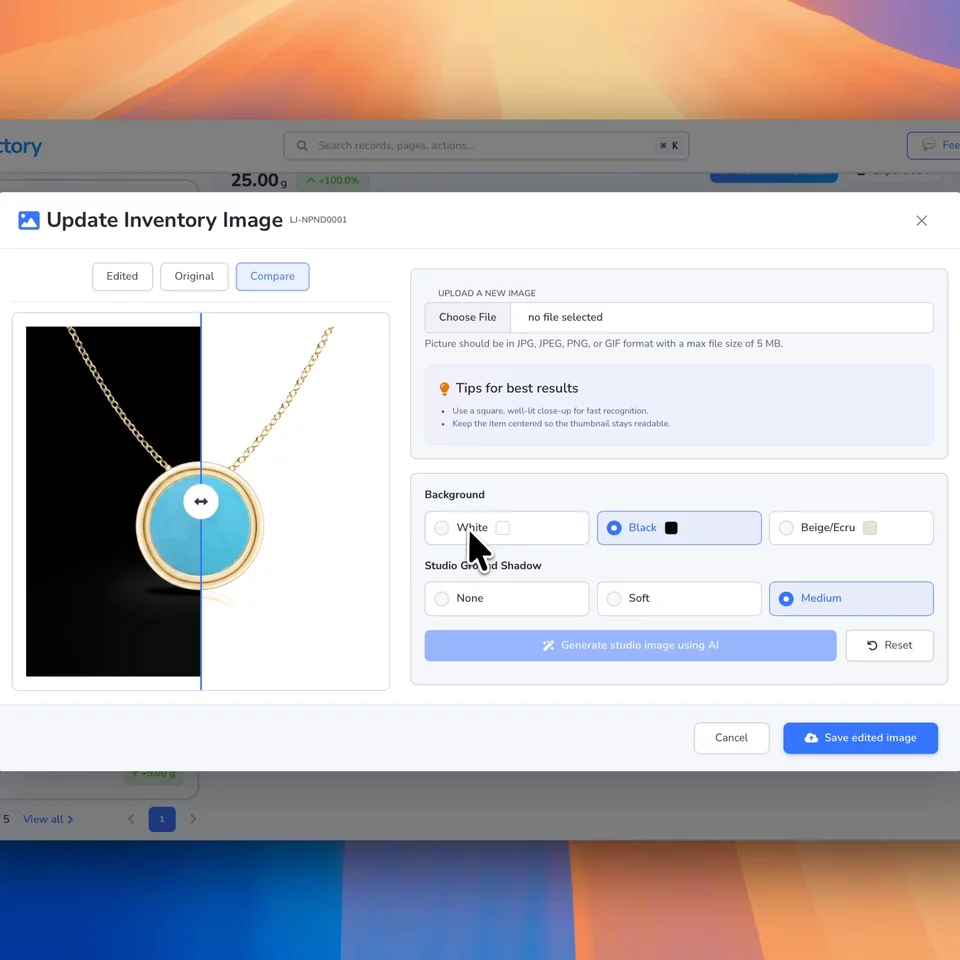
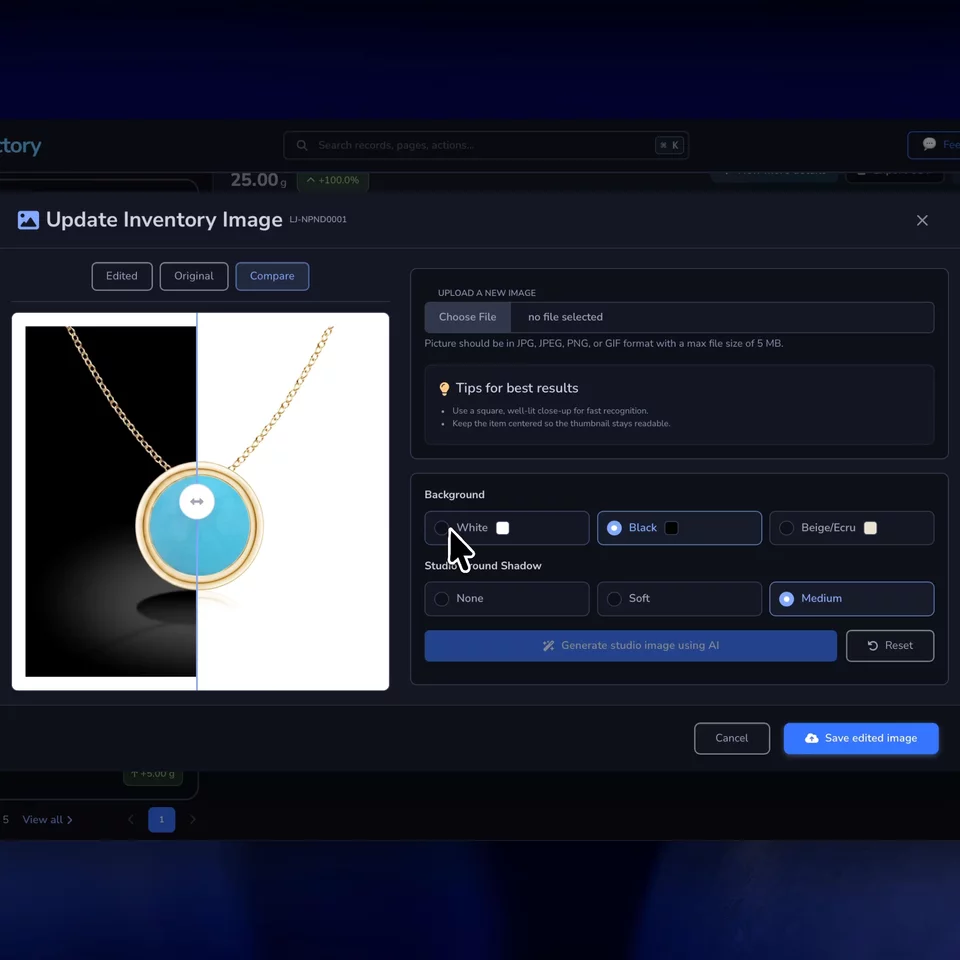
Preserve product details while Loupe Factory cleans the image background
The AI is designed to preserve the actual inventory item while cleaning the presentation around it. It attempts to replace the original background with the selected studio background, keep the product recognizable, and avoid turning the item into a different object.
- Preserves item shape, color, count, texture, finish, and visible details.
- Keeps gemstone facets, jewelry prongs, chains, holes, reflective areas, and fine edges intact.
- Keeps a Midnight Blue or Chocolate Brown backdrop from tinting metal, stones, and white areas.
- Adds a soft or medium ground shadow only when that option is selected.
- Relights the product only when a lighting style is selected. The product keeps its real colors and finish.
- Lets your team review the final image before it replaces the inventory avatar.
Save each AI-edited image back to the right inventory item
Generic AI photo editors are often built for creators, resellers, or small e-commerce sellers working from a folder of images. Loupe Factory is different because the image polish happens where manufacturers and wholesalers already manage inventory, products, and operations.
Teams that like batch editing tools usually want the same thing: a fast, repeatable way to clean a long image backlog. Loupe Factory approaches that need from the inventory record, so each approved image stays tied to the right item instead of becoming another file to reconcile later.
That matters when the photo is not just a marketing asset. It is tied to a lot, item record, customer approval, order line, catalogue, sales conversation, or internal workflow. The benefit is not only speed. It is keeping product image work connected to operational truth.
- Inventory records: Make item avatars easier to scan in tables and item detail pages.
- Product catalogues: Build more consistent product catalogue images from existing item photos.
- Wholesale buyer presentations: Send cleaner visuals without rebuilding images in separate tools.
- Sales teams: Give reps marketplace-ready visuals for quotes, approvals, and buyer follow-ups.
- Online listings: Prepare cleaner e-commerce product photos while keeping inventory context nearby.
- Customer approvals: Show a clearer product image before production, shipment, or invoice follow-up.
Replace separate product photo editing tools with Loupe Factory
| Workflow | Manual editing | Loupe Factory AI image polish |
|---|---|---|
| Where the work happens | Export the photo, open a separate editor, download the result, and re-upload it. | Edit from the inventory image modal inside Loupe Factory. |
| Background cleanup | Manual selection, masking, retouching, and repeated checks. | Select an available studio background and let AI create the cleaner product image. Professional, Business, and Enterprise users can also choose Beige/Ecru, Off-White, Midnight Blue, or Chocolate Brown. |
| Consistency | Depends on each person's editing skill and settings. | Uses the same workflow for repeatable catalogue-ready product images. |
| Operational context | The image can get separated from the item record. | The approved AI image is saved back as the inventory avatar. |
Use Loupe Factory AI images for everyday catalogue coverage
AI-enhanced inventory photos are not a blanket replacement for professional photography. Studio shoots still make sense for flagship campaigns, packaging, detailed creative direction, and high-value launches. The gap Loupe Factory helps fill is the everyday need for clean, consistent product photos across a large catalogue.
| Need | Studio photoshoot | AI-enhanced inventory photo |
|---|---|---|
| Best for | Campaign hero images, brand launches, and creative shoots. | Inventory records, catalogues, buyer decks, approvals, and listings. |
| Speed | Requires scheduling, setup, editing, and delivery. | Runs from an existing inventory photo in the product workflow. |
| Control | Maximum lighting, styling, angle, and art direction. | Focused on background cleanup, consistency, and reviewable product polish. |
| Best operating model | Use selectively for the most important products and campaigns. | Use often for routine item records and wholesale catalogue coverage. |
Give buyers consistent AI-edited product images for faster comparison
In wholesale, buyers often compare many similar items quickly. Inconsistent image backgrounds make that comparison harder. A clean image system helps buyers focus on the product instead of the photo environment.
For gemstones, jewelry, auto parts, and other item-heavy businesses, consistent product images also help internal teams work faster. Inventory tables become easier to scan, buyer presentations look more professional, and approvals are less likely to stall because the image is unclear.
Track AI image editing credits inside Loupe Factory
Loupe Factory charges AI image editing through the normal AI Credits system. Credits are calculated from AI token usage, and image edits use 10 AI credits per 1,000 tokens, rounded up, ten times the rate of text features such as storefront descriptions.
Each studio background generation is one AI image edit call. If a Professional, Business, or Enterprise user also selects Soft or Medium Studio Ground Shadow, Loupe Factory performs a second AI image edit call, so credit usage is roughly doubled. The final charge is recorded in the organization's AI usage logs under Inventory Image Editing.
| Image type | Background only | Background + shadow | Overage cost intuition |
|---|---|---|---|
| Small image, under 1 MB, around 800 to 1200 px | 30 to 50 credits | 60 to 100 credits | $0.30 to $1.00 |
| Medium image, 1 to 3 MB, around 1200 to 2400 px | 40 to 80 credits | 80 to 160 credits | $0.40 to $1.60 |
| Large image, 3 to 5 MB, high resolution | 60 to 120+ credits | 120 to 240+ credits | $0.60 to $2.40+ |
Cost intuition uses Loupe Factory's currently configured AI overage rate of $0.01 per AI credit. Actual usage can vary because the AI provider may report different token usage based on image complexity, resolution, and output size.
AI product image polish is available on all Loupe Factory plans. Professional, Business, and Enterprise plans unlock the Beige/Ecru, Off-White, Midnight Blue, and Chocolate Brown backgrounds, the Soft or Medium Studio Ground Shadow settings, and the four Studio Lighting styles for teams that want more catalogue presentation control. Admins can review plan allocation, remaining credits, purchased credits, overage, and usage history from the AI Credits page.
Upload product photos Loupe Factory AI can polish cleanly
Inventory images support JPG, JPEG, PNG, GIF, and WebP uploads up to 4 MB. Best results come from clear product photos where the item is visible and centered.
- Use a square or near-square product photo when possible.
- Center the item in the frame with good lighting.
- Avoid cropped edges, hands, labels, papers, trays, and busy background clutter.
- Let the product fill around 60% to 85% of the image.
- Use 1:1 square when possible. 4:5, 3:4, and 4:3 can also work.
- Avoid very wide panoramic images, very tall narrow images, and heavily cropped photos.
Loupe Factory displays inventory avatar previews in a square image area, so square photos usually look best in inventory tables, item records, and catalogue-style views.
Create catalogue-ready product images in Loupe Factory
Loupe Factory brings AI product photography into the same system where teams manage inventory, products, orders, approvals, and operations. That helps manufacturers and wholesalers create cleaner product images faster without losing the context behind each item.
